- Best all-round: QuillBot — handles text, articles and PDFs with a genuinely usable free tier.
- Best for long or multiple documents: Google NotebookLM — free, grounded in your sources, and it cites which page each claim came from.
- Best for control over the output: Claude or ChatGPT — you specify length, audience and format instead of taking what you’re given.
- Best for research papers: Scholarcy — extracts methods, findings and references rather than compressing prose.
- Never trust a summary of anything that matters without spot-checking two claims against the source. Summarisers drop caveats first.
The best AI summarizer for most people is QuillBot, because it covers pasted text, article URLs and PDFs in one place and the free tier is enough for regular use. If you are summarising something long — a 200-page report, a stack of PDFs, a course reader — Google NotebookLM is better and free, because it stays grounded in your documents and cites where each point came from.
Below: what each tool is best at, what it costs, and the accuracy problem that applies to all of them. Part of our AI productivity tools hub.
The best AI summarizers compared
| Tool | Best for | Handles | Free tier | Paid from (Aug 2026) |
|---|---|---|---|---|
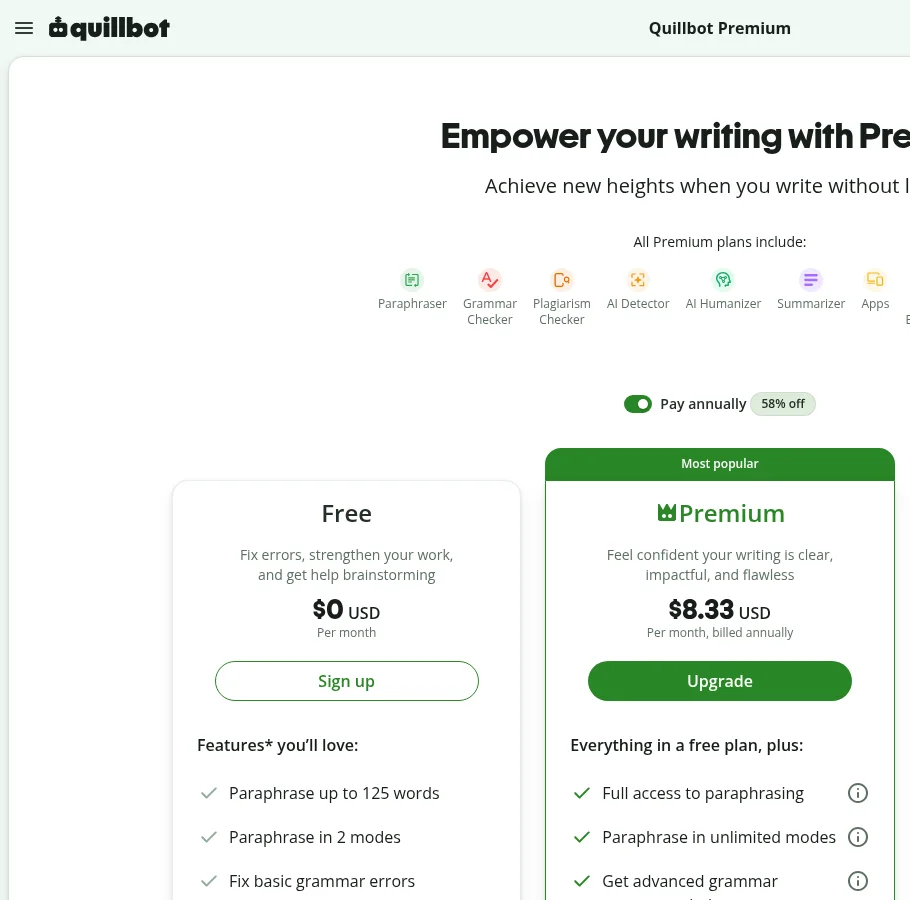
| QuillBot | Everyday all-round summarising | Text, URLs, PDFs | Yes, generous | ~$8-10/mo |
| NotebookLM | Long documents and multi-source | PDFs, docs, slides, URLs, video | Yes, free | Free (paid tier for higher limits) |
| Claude | Nuanced summaries you control | Text, PDFs, long context | Yes | ~$20/mo |
| ChatGPT | Flexible formats and follow-ups | Text, PDFs, URLs | Yes | ~$20/mo |
| Scholarcy | Academic papers | Papers, references | Limited | Subscription |
| Otter / Fireflies | Meeting summaries | Live calls, recordings | Yes | From ~$8-10/user/mo |
1. QuillBot — best all-round summarizer
QuillBot’s summariser handles the three inputs most people actually have — pasted text, a URL, or an uploaded PDF — and gives you a slider between key-sentence extraction and a rewritten paragraph. That single control covers most needs: extraction when you want the author’s own wording, paraphrase when you want it shorter and smoother.
The free tier has a word limit per summary but no meaningful daily cap for normal use, which makes it the default recommendation. Paid plans run around $8-10/month and mostly buy longer inputs plus the rest of the QuillBot suite. See our QuillBot review for the wider toolset.
Who should skip it: anyone summarising 100+ page documents or several sources at once. The word cap becomes the whole experience.
2. Google NotebookLM — best for long and multi-document work
NotebookLM is the strongest free tool in this category and the least known. You upload your sources — PDFs, Google Docs, slides, web pages, video transcripts — and it answers questions and generates summaries grounded in those sources only, with inline citations pointing back to the passage it used.
That citation behaviour is the important part. Every other tool on this list gives you a fluent summary you have to trust. NotebookLM gives you a summary you can verify in two clicks, which changes how safely you can use it for anything consequential.
Who should skip it: anyone who wants to paste three paragraphs and get two sentences. The notebook setup is overhead for small jobs.
3. Claude and ChatGPT — best when you need control
Dedicated summarisers decide the shape of the output for you. A chatbot lets you specify it: “summarise this in five bullets for someone who has not read the background”, “give me only the objections raised”, “what changed between version one and two”.
That flexibility is why many people stop using dedicated summarisers once they pay for a chatbot. Claude handles long documents particularly well and tends to preserve nuance rather than flattening it; ChatGPT is stronger on follow-up questions and format switching. Both around $20/month, both with free tiers that cover occasional use. See our ChatGPT vs Claude comparison.
4. Scholarcy — best for research papers
Scholarcy does something structurally different: rather than compressing prose, it extracts the parts of an academic paper you need — study design, sample, findings, limitations, and a linked reference list. For literature reviews, that is a categorically better output than a paragraph summary.
Who should skip it: anyone not reading academic literature. Outside that use case it is an expensive way to shorten a blog post. For general research work, our AI research assistant guide covers better-fitting options.
5. Meeting summarisers are a separate category
If what you want summarised is a conversation, general summarisers are the wrong tool — they cannot hear it. Otter, Fireflies and similar tools record and transcribe the call first, then summarise with speaker attribution and action items. See our best AI meeting assistants roundup and what Otter.ai does.
Which summarizer should you pick?
- Articles, emails, short reports: QuillBot free tier.
- A long PDF or several documents: NotebookLM, free.
- You already pay for a chatbot: use it. You do not need a second subscription.
- Academic papers: Scholarcy.
- Meetings and calls: a meeting assistant, not a summariser.
- YouTube videos: paste the transcript into a chatbot, or add the URL to NotebookLM.
The accuracy problem, stated plainly
Every tool here produces fluent, confident summaries. Fluency is not accuracy, and the failure modes are predictable:
- Caveats disappear first. “The study found X, though only in a small sample of young adults” becomes “The study found X.” The hedge is exactly what compression removes, and it is often the most important part.
- Emphasis gets flattened. A point the author raised once and dismissed can appear with the same weight as their central argument.
- Structure gets imposed. Ask for five bullets and you will get five, whether or not the source had five ideas.
- Long inputs get truncated silently. Some tools summarise the first portion of a document and do not tell you. If a summary of a 90-page report never mentions anything from the second half, that is what happened.
The practical safeguard costs thirty seconds: pick two specific claims from the summary and find them in the source. If both check out, the rest is probably sound. If either is a distortion, read the document. For anything with money, legal or medical consequences attached, the summary is a reading aid, not a substitute.
Bottom line
QuillBot is the best AI summarizer for everyday use and its free tier covers most people permanently. NotebookLM is the better tool for anything long or multi-source, it is free, and its citations make it the only option here you can genuinely verify. If you already pay for Claude or ChatGPT, you do not need to buy a summariser at all — you need a better prompt. Whatever you use, spot-check two claims before you act on a summary that matters.
More in the AI productivity tools hub, or see our AI rewriter guide if you need to reword rather than shorten.
FAQ
What is the best AI summarizer in 2026? QuillBot is the best all-round choice for text, articles and PDFs with a generous free tier. Google NotebookLM is better for long or multiple documents because it cites the source passage for each point, and it is free.
Is there a free AI summarizer? Yes. QuillBot’s free tier handles regular summarising, NotebookLM is free for document-based work, and ChatGPT and Claude both summarise on their free plans.
What is the best AI summarizer for long PDFs? NotebookLM, because it is built for multi-document work and grounds every answer in your uploaded sources with citations. Claude also handles long documents well if you want more control over the output format.
Are AI summaries accurate? They are fluent but lossy. Caveats and qualifications are dropped first, emphasis gets flattened, and some tools silently truncate long inputs. Spot-check two claims against the source before relying on a summary.
Can AI summarise a YouTube video? Yes. Paste the transcript into a chatbot, or add the video URL to NotebookLM, which handles video transcripts as a source type.
Do I need a dedicated summarizer if I have ChatGPT? Usually not. A chatbot lets you specify length, audience and format, and ask follow-up questions — which most dedicated summarisers do not allow.