- Best free: Fathom — unlimited basic recording and summaries on the free plan, with no per-meeting cap.
- Best for teams and sales: Fireflies — CRM integrations, topic tracking and conversation analytics.
- Best with no bot in the call: Granola — records from your device and enhances the notes you type yourself.
- Best for live captions: Otter.ai — still the strongest real-time transcription experience.
- The real decision is bot or no bot. A visible AI participant changes sales calls, interviews and sensitive conversations. Pick on that first, features second.
The best AI meeting assistant for most people is Fathom, because its free plan is not a trial — it records, transcribes and summarises unlimited meetings without a per-call time limit, which is more than most competitors give you for money. If you run a sales team, Fireflies is worth paying for. If you would rather no AI bot appeared in your calls at all, Granola solves a problem the others don’t.
Here is the full comparison, including the consent and privacy questions most roundups skip. Part of our AI productivity tools hub.
The best AI meeting assistants compared
| Tool | Best for | Joins as a bot? | Free tier | Paid from (Aug 2026) |
|---|---|---|---|---|
| Fathom | Best free plan overall | Yes | Unlimited basic recording | $15-25/user/mo |
| Fireflies | Sales teams, CRM, analytics | Yes | Limited | ~$10-19/user/mo |
| Granola | Bot-free, note-led workflow | No | Limited | Subscription |
| Otter.ai | Live captions and search | Yes | 300 min/mo, 30 min/call | ~$8.33/user/mo annual |
| tl;dv | Video clips and multi-language | Yes | Yes | Subscription |
| Avoma | Revenue teams, deal coaching | Yes | Limited | Subscription |
| Fellow | Security-conscious organisations | Optional | Limited | Subscription |
1. Fathom — best free AI meeting assistant
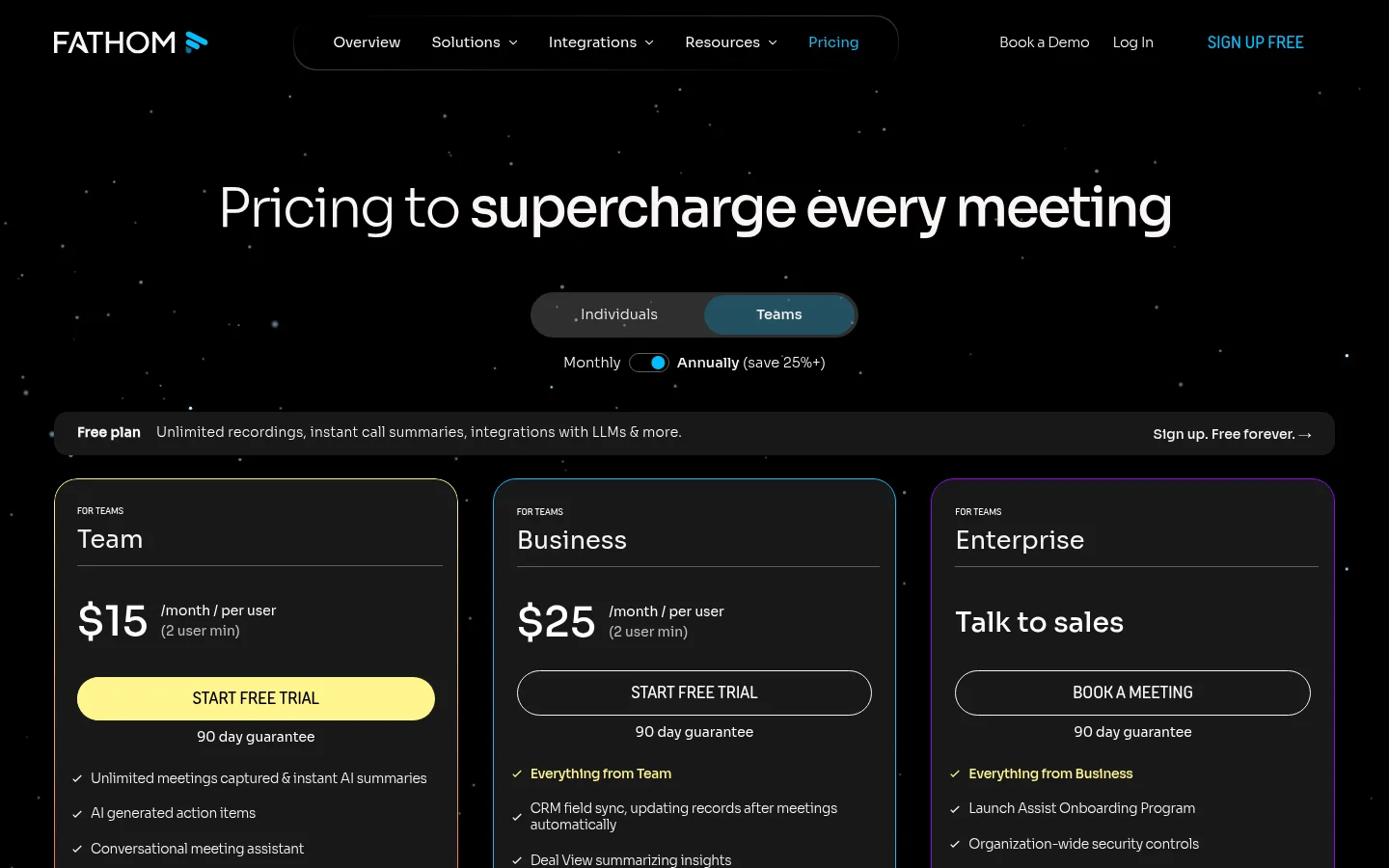
Fathom’s free plan is the outlier in this category. Unlimited recording, transcription and AI summaries across Zoom, Google Meet and Microsoft Teams, with no cap on meeting length. Most competitors’ free tiers exist to make you upgrade; Fathom’s is usable indefinitely for an individual.
Summaries are fast — typically available within a minute of the call ending — and action-item extraction is reliable. Paid team plans are $15/user/month (Team) and $25/user/month (Business) billed annually, both with a two-seat minimum, adding CRM field sync, deal insights and coaching analytics.
Who should skip it: teams needing deep conversation analytics or coaching scorecards. Fathom is excellent at capturing meetings and lighter on analysing them.
2. Fireflies — best for teams and sales
Fireflies is built for organisations rather than individuals. It logs calls to your CRM, tracks which topics came up across every conversation, flags questions and objections, and gives managers a searchable archive of the whole team’s calls. For revenue teams that visibility is the product.
Real pricing: a limited free tier, with paid plans roughly $10-19/user/month depending on tier and billing. Integration depth is what you are paying for.
Who should skip it: solo users. You would be buying team analytics for a team of one — Fathom’s free plan covers the same capture job.
3. Granola — best if you don’t want a bot in the call
Granola works differently from everything else here. There is no participant that joins your meeting. It listens through your computer’s audio, you type rough notes as you normally would, and afterwards it merges your notes with the full transcript into a clean summary.
Two advantages follow. First, nothing announces itself to the other side, which matters in client calls, interviews and negotiations where a recording bot changes the temperature of the room. Second, the output is shaped by what you thought was important, not just what the model extracted.
Who should skip it: anyone who wants zero involvement during the meeting. Granola rewards taking sparse notes; if you type nothing, you get a plain transcript summary. Also note that removing the visible bot does not remove your consent obligations — see below.
4. Otter.ai — best for live captions and search
Otter remains the strongest real-time experience: text appears as people speak, with live captioning for Zoom and Google Meet, which makes it the best pick where accessibility matters. Its searchable archive across months of meetings is genuinely useful once it builds up.
Real pricing: free plan gives 300 minutes a month with a 30-minute cap per conversation; Pro runs about $8.33/user/month billed annually (around $16.99 monthly). Full detail in our Otter.ai explainer and Otter.ai review.
Who should skip it: anyone whose meetings are in-person with several speakers, and anyone who needs more than 30 minutes per call without paying. Accuracy in crowded rooms is Otter’s weakest point.
5. tl;dv, Avoma and Fellow — the specialists
tl;dv is built around video: timestamped highlights, shareable clips, and broad multi-language support. Best when you need to send someone the 90 seconds that matter rather than a transcript.
Avoma targets revenue teams with deal intelligence, coaching scorecards and pipeline context. Overkill unless you manage a sales org.
Fellow leads on governance: flexible bot and botless modes, strict data-handling controls, and meeting-agenda workflows. The pick when procurement has opinions.
Which AI meeting assistant should you pick?
- Individual, want it free: Fathom.
- Sales team with a CRM: Fireflies, or Avoma if you need coaching.
- Client-facing calls where a bot is awkward: Granola.
- Accessibility or live captions: Otter.
- Sharing highlights across languages: tl;dv.
- Enterprise with security review: Fellow.
Bot or botless: the decision that actually matters
Every feature comparison in this category buries the one difference people notice immediately.
Bot-based tools (Fathom, Fireflies, Otter, tl;dv, Avoma) join as a visible participant. Upside: they capture everything regardless of whose device is in the room, they work when you are not the host, and their presence effectively announces that recording is happening. Downside: in a first sales call or a candidate interview, an AI notetaker appearing in the participant list changes how people speak. Some organisations block them outright.
Botless tools (Granola, and Fellow’s botless mode) capture device audio with nothing visible to others. Upside: the conversation stays normal. Downside: you must be in the meeting on that device, and — importantly — the absence of a visible bot makes it your job to disclose that you are recording.
Decide this before you compare anything else. A tool that captures perfectly but changes your calls is the wrong tool, and so is one that gets you into a consent problem.
Consent, privacy and what to check before you deploy
Recording law varies by jurisdiction, and several US states plus many countries require consent from all parties, not just you. Three practical rules:
- Say it out loud. “I’ve got an AI notetaker on this call, is that alright?” takes three seconds and resolves the issue. A bot in the participant list is notice, not consent.
- Check retention and training. Confirm how long transcripts are stored, who in your workspace can search them, and whether your data is used to train models. Business tiers usually give you controls the free tier does not.
- Set a policy before the team adopts it. Once five people are recording client calls into a shared searchable archive, you have created a records-management question. Better to answer it deliberately.
For sensitive conversations — HR matters, legal discussions, anything covered by a confidentiality agreement — the right answer is often no assistant at all.
Bottom line
Fathom is the best AI meeting assistant for most individuals, and its free plan is good enough that trying it costs nothing but ten minutes. Fireflies earns its subscription for sales teams that live in a CRM. Granola is the right answer whenever a visible bot would change the conversation, and Otter still leads on live captions. Decide bot or botless first, run one tool across two weeks of real meetings, and check your consent obligations before you roll it out to anyone else.
More in the AI productivity tools hub, or see our best AI note taking apps guide for notes outside meetings.
FAQ
What is the best AI meeting assistant in 2026? Fathom is the best overall for individuals thanks to an unlimited free plan. Fireflies is best for sales teams needing CRM integration and analytics, Granola is best when you do not want a bot in the call, and Otter is best for live captions.
Is there a free AI meeting assistant? Yes. Fathom’s free plan includes unlimited basic recording, transcription and summaries with no per-meeting cap. Otter’s free plan gives 300 minutes a month with a 30-minute limit per conversation.
Can I use an AI notetaker without a bot joining the meeting? Yes. Granola and Fellow’s botless mode capture audio from your own device, so no participant appears to others. You are then responsible for telling attendees that the call is being recorded.
Do I need permission to record a meeting with AI? Usually yes. Many jurisdictions require consent from all parties. A visible bot is notice rather than consent, so state at the start that an AI notetaker is running and confirm everyone is comfortable.
What is the difference between Otter and Fireflies? Otter is stronger on live captioning and has a more approachable free plan for individuals. Fireflies is stronger on CRM integration, topic tracking and team conversation analytics, which suits sales organisations.
Do AI meeting assistants work for in-person meetings? Some do, via a phone or laptop microphone, but accuracy drops sharply with several speakers, room echo or overlapping talk. Test on a real in-person meeting before relying on one.