- Best overall: Suno — the strongest full songs with vocals, and the clearest path to commercial use.
- Read this before you generate: on Suno, commercial rights are not retroactive. A track you make on the free tier does not become licensed when you upgrade later.
- Best for background music you can safely publish: Soundraw — less exciting output, far simpler licensing.
- Udio is in transition. It settled with a major label and restricted downloads during its licensing move. Verify current export rules before subscribing.
- The whole category is legally unsettled. Treat commercial rights as a moving target and re-read the terms before any release.
The best AI music generator in 2026 is Suno for anyone who wants finished songs with vocals, and Soundraw for anyone who just needs safe background music for videos. But the more important question in this category is not which tool sounds best — it is which one lets you legally use what it makes. That answer changed twice in the last year.
Here is what each tool does well, what it really costs, and the licensing detail that catches people out. Part of our AI video and audio tools hub.
The best AI music generators compared
| Tool | Best for | Free tier | Paid from (Aug 2026) | Commercial use |
|---|---|---|---|---|
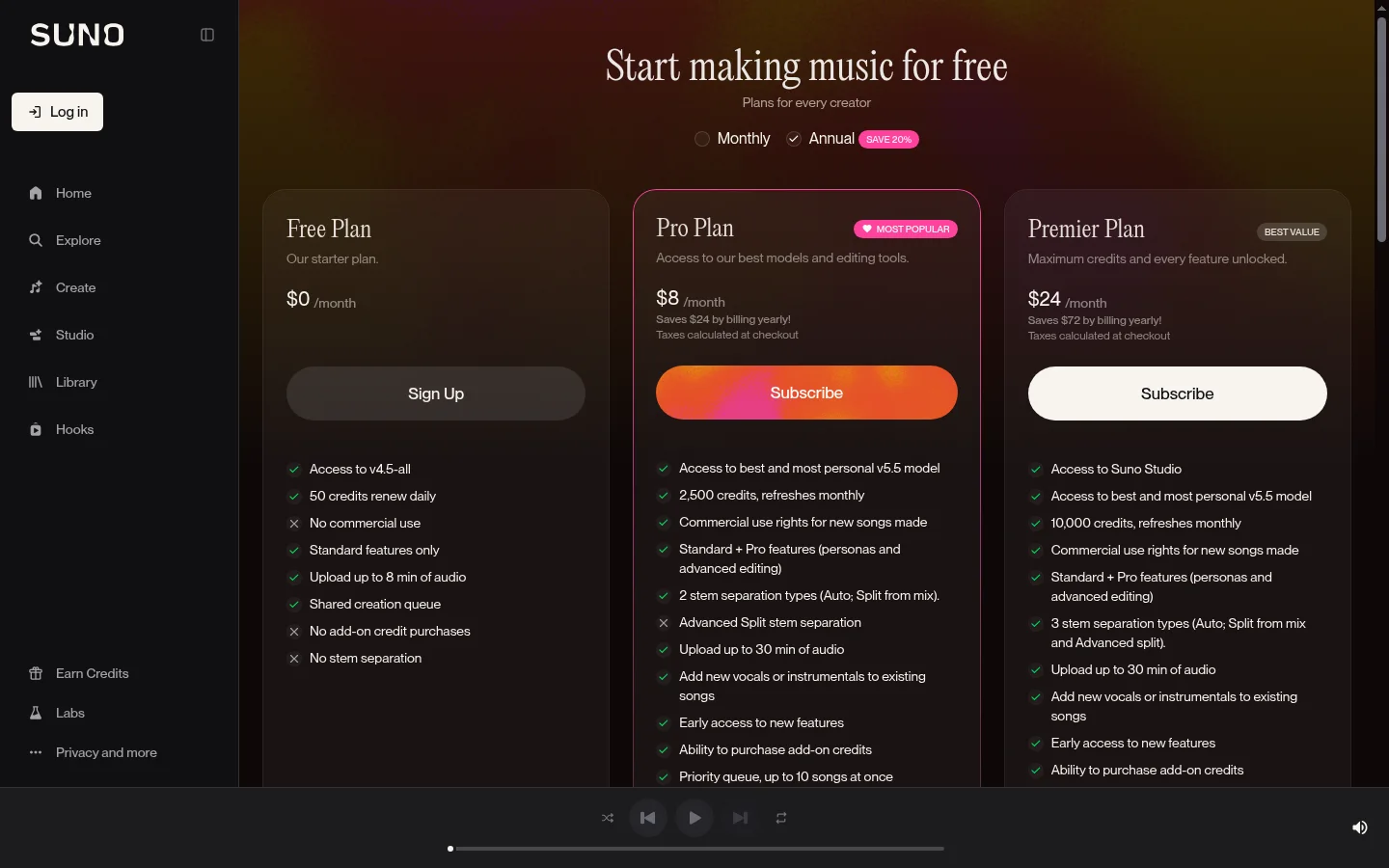
| Suno | Full songs with vocals | ~50 credits/day, no download | ~$8/mo Pro, $24/mo Premier (annual) | Pro tier and above, not retroactive |
| Udio | Instrumentals, editing control | 10/day + 100/month credits | ~$10/mo; $30/mo Pro | Paid plans; exports restricted in transition |
| Stable Audio | Developers, sound design | Open weights available | API / enterprise licence | Depends on model licence |
| Soundraw | Royalty-free background music | Trial only | Subscription | Included with plan (restrictions apply) |
| Moises | Stem separation and remix prep | Yes | ~$3.99/mo | Depends on source material |
| LANDR | AI mastering and distribution | Limited | Subscription tiers | Your own tracks |
1. Suno — best overall
Suno is what most people mean when they say “AI music generator”. You describe a genre and mood, optionally supply lyrics, and get a structured song with vocals in under a minute. Vocal quality is the clear category lead, genre coverage is the widest, and the Premier tier adds Suno Studio, an in-browser editing environment that bridges generation and arrangement.
Real pricing: the free tier gives roughly 50 credits a day (about ten songs). Pro is about $8/month billed annually (around $10 monthly) and Premier about $24/month annually (around $30 monthly). Commercial use rights start at Pro, not Premier — Premier buys you Suno Studio, 10,000 monthly credits instead of 2,500, and advanced stem separation. Paid plans carry monthly download caps.
The catch that costs people real money: after Suno’s settlement with Warner Music Group in late 2025, free-tier tracks became playable and shareable but not downloadable, and not usable commercially. Critically, upgrading later does not grant rights to a track you already made. If a free-tier song takes off, you cannot retroactively license it. Subscribe before you create anything you might publish.
Who should skip it: anyone who only needs 30 seconds of background music under a talking-head video. You are paying for songwriting features you will never open — Soundraw is cheaper and the licensing is simpler.
2. Udio — best editing control, but check the exit door
Udio takes a more production-minded approach: timeline-style editing, inpainting to fix a specific section without regenerating the whole track, and extension in 30-second increments. On instrumentals and arrangement clarity it is arguably ahead of Suno.
Real pricing: free tier gives around 10 daily plus 100 monthly credits. Standard is about $10/month, Pro about $30/month, with stem downloads on paid plans.
The catch: Udio settled with Universal Music Group in late 2025 and moved toward a licensed, more closed platform. During that transition it temporarily disabled downloads across all tiers — audio, video and stems. Exports are expected to return, but “expected” is not a plan. Verify the current download status on your intended plan before paying. A tool you cannot export from is a toy.
Who should skip it: anyone who needs files out today for a client deadline.
3. Soundraw — best for creators who just need safe background music
Soundraw is not trying to write hit songs. You pick genre, mood, length and structure, and it generates royalty-free instrumental beds designed to sit under video. The output is less impressive than Suno’s and that is exactly the point: it is built to be licensed clearly and used without thinking about it.
For YouTubers, podcasters and anyone producing client video, this is usually the correct purchase. The licence is included with the subscription (with restrictions worth reading), so the compliance question disappears.
Who should skip it: songwriters. There are no vocals worth using and no songwriting workflow.
4. Stable Audio — best for developers and sound design
Stable Audio releases models with open weights, which makes it the option for anyone who wants to run generation locally, build it into a product, or generate sound effects and textures rather than songs. Quality on instrumentals and sound design is strong; it is not a consumer songwriting tool and does not pretend to be.
Who should skip it: anyone who does not want to think about model weights, APIs or licences per model.
5. Moises and LANDR — the supporting cast
Moises separates an existing track into stems — vocals, drums, bass, instruments — which is what you want for remixes, practice tracks, or pulling a vocal off a reference. Paid plans start around $3.99/month. It does not generate music.
LANDR masters tracks you have already made and handles distribution. If you are finishing real music rather than generating it, this is the last step in the chain, not a competitor to Suno.
Which AI music generator should you pick?
- You want full songs with vocals to release: Suno Pro is enough — it already carries commercial rights. Go Premier only for Suno Studio, stem control or the higher credit ceiling. Either way, subscribe before you generate.
- You want background music for video, hassle-free: Soundraw.
- You want deep editing and instrumental quality: Udio — after confirming exports work on your plan.
- You are building a product or need sound design: Stable Audio.
- You are remixing or practising: Moises.
- You just need one track for one video: use a stock music library. A month of any subscription here costs more than a single licensed track.
The licensing situation, in plain terms
This is the part most roundups skip, and it is the part that can cost you a monetised channel.
Two major labels — Warner and Universal — settled with the leading AI music platforms in late 2025, which is why both Suno and Udio changed their ownership and export rules. Sony has not settled, and its cases are expected to produce a significant ruling around the middle of 2026. That ruling turns on whether training on copyrighted material is fair use, so its effects will reach well beyond music.
What this means for you, practically:
- Subscribe before you create anything intended for commercial use. Rights are granted at generation time on the major platforms, not at download time.
- Re-read the terms before each release, not once a year. These pages changed multiple times in the last twelve months.
- Keep records of which plan you were on when a track was generated. If a platform’s terms change later, that record is your evidence.
- For client work, prefer the clearly-licensed option. Soundraw or a stock library carries far less risk than a generated song whose provenance is still being litigated.
Bottom line
Suno is the best AI music generator in 2026 and the only one most people need — but its value depends entirely on being on a paid plan before you generate anything you intend to publish. Pro is the tier most people need; Premier is for heavy users. Soundraw is the smarter, duller choice for creators who need background music without a licensing headache. Udio has the better editing tools and the murkier export situation. Whatever you pick, treat the terms page as part of the product and check it before every release.
Pair it with the rest of your stack via the AI video and audio tools hub, or see our ElevenLabs review for voice rather than music.
FAQ
What is the best AI music generator in 2026? Suno leads for full songs with vocals and has the clearest commercial-rights path, starting on its Pro tier. Soundraw is better for royalty-free background music, and Udio offers stronger editing control.
Is there a free AI music generator? Yes. Suno offers around 50 free credits a day and Udio offers daily plus monthly credits, but free-tier tracks generally cannot be downloaded or used commercially. Stable Audio publishes models with open weights at no cost.
Can I legally sell or monetise AI-generated music? Only under the platform’s current terms and usually only on a paid plan. On Suno, commercial rights apply to tracks generated while subscribed and are not granted retroactively, so upgrade before you create.
What is the difference between Suno and Udio? Suno is stronger on vocals, genre range and export-friendly commercial use. Udio is stronger on instrumental detail and section-level editing, but restricted downloads during its licensing transition.
Can I use AI music on YouTube? Yes, if your plan grants commercial rights for the track in question. Free-tier output typically does not qualify, and monetised channels are exactly where that distinction gets enforced.
Will AI music generators still work the same next year? Probably not. Both leading platforms changed ownership and export rules following label settlements in 2025, and a pivotal court ruling was expected around mid-2026. Re-read the terms before each release.