Grammarly is the writing tool most people should install first. It checks grammar, spelling, and clarity everywhere you type — email, docs, browser, Slack — in real time, and the free plan alone is genuinely useful.
It is not a content generator like Jasper and not a pure paraphraser like QuillBot. Grammarly’s job is to make the writing you produce cleaner and clearer — and it’s the best in the business at that.
What is Grammarly?
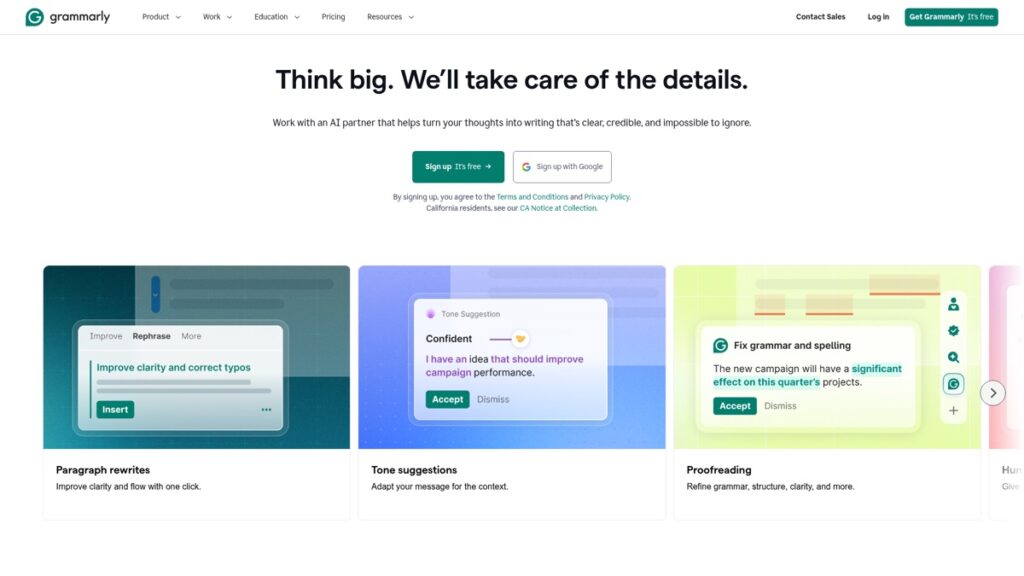
Grammarly is an AI writing assistant that checks grammar, spelling, punctuation, clarity, conciseness, and tone as you write. It runs as a browser extension, desktop app, mobile keyboard, and add-ins for Microsoft Word and Google Docs, so it follows you across almost everything you type. Newer versions add generative AI that can draft, rewrite, and shorten text on command.
Grammarly’s key features
Real-time corrections (the core)
The underlines are the reason to use it: grammar and spelling fixes plus clarity rewrites that untangle wordy sentences. It’s fast, unobtrusive, and works in nearly every text box on your computer — the widest coverage of any writing tool.
Tone detection & rewrites
Grammarly flags how your message reads (confident, friendly, formal) and Premium suggests full-sentence rewrites for clarity, tone, and word choice — the features that actually justify the upgrade for professionals and ESL writers.
Generative AI
Grammarly’s built-in AI can draft emails, rewrite paragraphs, brainstorm, and adjust length from a prompt — handy for quick tasks without leaving your document.
Plagiarism checker & more
Premium includes a plagiarism checker (useful, though not as thorough as academic tools like Turnitin), plus a citation generator and consistency checks for larger documents.
Grammarly pricing (2026)
Confirm current pricing on Grammarly’s site — plans and AI-prompt limits change.
| Plan | Price (approx.) | What you get |
|---|---|---|
| Free | $0 | Grammar, spelling, punctuation, basic clarity + limited AI prompts |
| Premium | ~$12/mo annual → ~$30 monthly | Full clarity/tone/word-choice rewrites, more generative AI, plagiarism checker |
| Business | ~$15/user/mo | Team style guide, brand tones, analytics, admin controls |
Buy annual — monthly Premium is more than double the yearly rate.
Pros and cons
✅ Pros
- Best real-time grammar and clarity engine available
- Works almost everywhere you type — unmatched integration
- Excellent free plan you can rely on before paying
- Tone detection and rewrites genuinely improve professional writing
❌ Cons
- Premium is pricey month-to-month (buy annual)
- Over-suggests — it will try to flatten voice, so ignore some prompts
- Weaker on creative and highly technical writing
- Not a from-scratch content generator; plagiarism checker is basic
Who should use Grammarly (and who should skip)
Install the free plan if you write anything for work or school — there’s little reason not to. Upgrade to Premium if clarity and tone rewrites save you real editing time, or English isn’t your first language. Skip Premium if you mainly need paraphrasing (QuillBot is cheaper) or full content generation (see the best AI writing tools).
Grammarly vs the alternatives
For pure grammar and clarity, nothing matches Grammarly’s coverage. QuillBot wins on paraphrasing and price; ProWritingAid offers deeper style reports for fiction; Microsoft Editor is a free, lighter alternative bundled with Office. Most writers pair Grammarly with a generator like Jasper or Writesonic.
Bottom line: is Grammarly worth it?
The free plan is essential; Premium is worth it for heavy writers. If you write emails, docs, and posts all day — especially as a non-native speaker — Premium pays for itself in cleaner drafts and less editing. Light writers can live happily on free. Try Grammarly →
FAQ
Is Grammarly free? Yes — the free plan covers grammar, spelling, punctuation, and basic clarity, plus a limited number of AI prompts.
Is Grammarly Premium worth it? For professionals, students, and ESL writers who write daily, yes — the clarity and tone rewrites save real time. Occasional writers can stay on free.
Is Grammarly safe and private? Grammarly processes your text on its servers to give suggestions; review its privacy settings and avoid pasting sensitive data you can’t share. Business plans add stronger controls.
Grammarly vs QuillBot — which is better? Grammarly wins on grammar, clarity, and integrations; QuillBot wins on paraphrasing and price. Many writers use both.
Does Grammarly work in Google Docs and Word? Yes — via a browser extension for Docs and a dedicated add-in for Microsoft Word, plus a desktop app and mobile keyboard.
Can Grammarly write content for me? Its generative AI can draft and rewrite short pieces, but for long-form articles a dedicated generator like Jasper or Writesonic is better.
🧰 More: AI Writing hub · QuillBot review · All AI Tools
