- Best overall: Gamma — fastest prompt-to-deck, best free tier, from about $9/seat/month annually.
- Best if the deck must be a real PowerPoint: Plus AI — it generates natively inside Google Slides and PowerPoint instead of exporting to them.
- Best for brand consistency: Beautiful.ai — templates auto-format so nobody can break the layout.
- Check the export before you buy. Several tools are web-first; a deck that looks great in the browser can fall apart as a .pptx.
- Free tiers are one-time credits, not monthly. Gamma’s free 400 credits do not refill — that surprises people at deck three.
The best AI presentation maker for most people is Gamma: type a topic, get a designed deck in under a minute, and edit it in a card-based editor that is genuinely pleasant. If your organisation lives in PowerPoint and decks get passed around and edited by other people, Plus AI is the better answer because it works inside the tools you already use.
Below: what each tool does, real 2026 pricing including the tier jumps that matter, and who should skip each one. Part of our AI productivity tools hub.
The best AI presentation makers compared
| Tool | Best for | Free tier | Entry price (annual, Aug 2026) | Native PPT/Slides? |
|---|---|---|---|---|
| Gamma | Fast, good-looking decks from a prompt | 400 one-time credits | ~$9/seat/mo (Plus) | Export only |
| Plus AI | Decks that stay in Google Slides / PowerPoint | No (7-day trial) | ~$10/user/mo | Yes, native |
| Beautiful.ai | Brand consistency and auto-formatting | No (14-day trial) | ~$12/user/mo (Pro) | Export only |
| Canva | All-in-one design plus presentations | Yes | ~$12-15/mo | Export only |
| Prezi | Non-linear, zoomable presentations | Yes (500 AI credits) | ~$7/mo Standard | No |
| SlidesAI | Adding AI inside Google Slides | Yes (limited) | ~$10/mo | Yes, add-on |
1. Gamma — best overall
Gamma is the tool most people should try first. You give it a topic and a slide count, and it produces a coherent deck with generated imagery matched to the theme’s colour scheme. The output does not look like a template someone filled in, which is the failure mode of most AI deck builders. It also exports to web, PDF and PowerPoint, and doubles as a document and webpage builder.
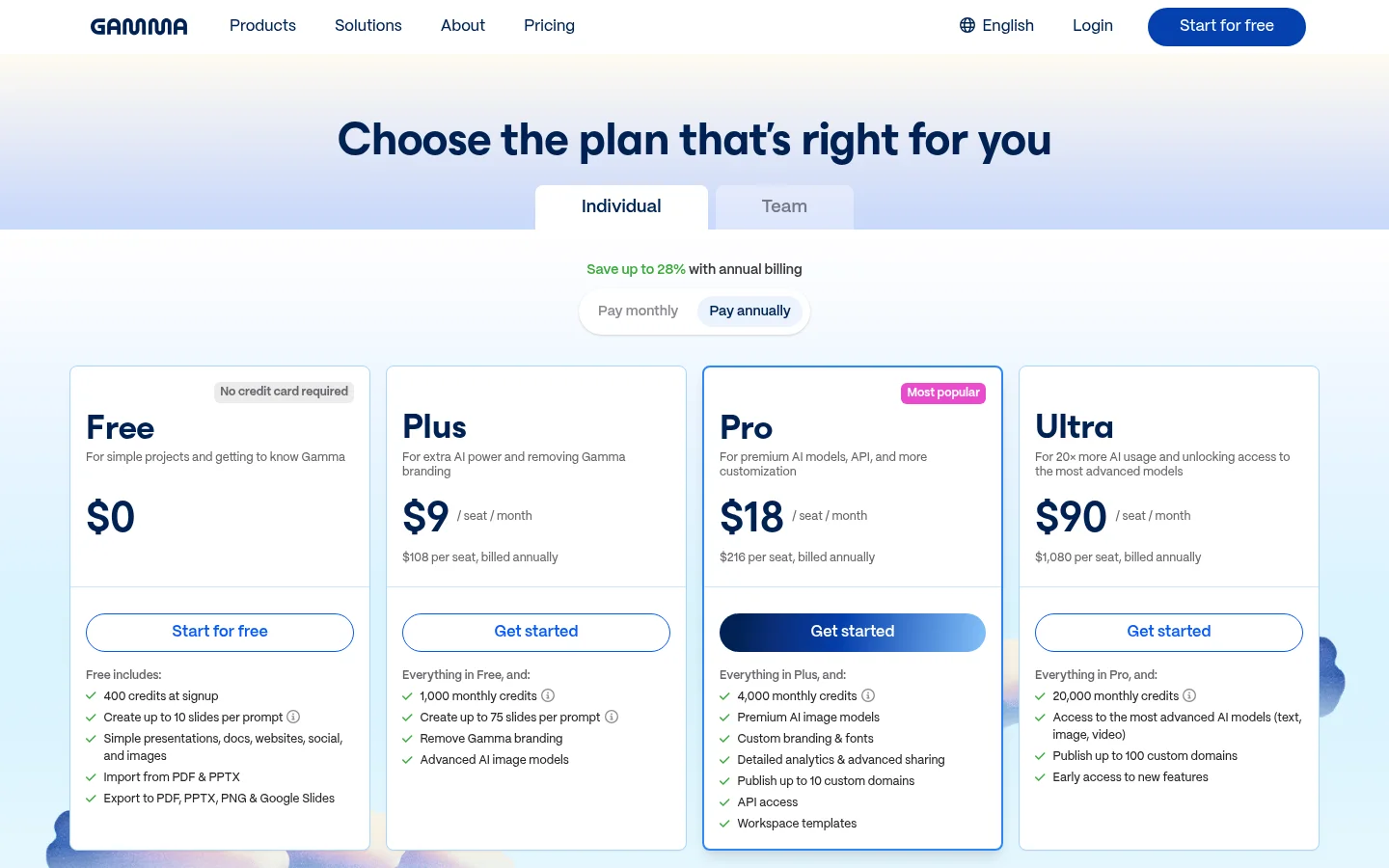
Real pricing: free tier gives 400 one-time credits — roughly eight to ten decks — with Gamma branding on exports. Plus is about $9/seat/month billed annually ($12 monthly) for 1,000 monthly credits and no branding. Pro is about $18/seat/month annually ($25 monthly) for 4,000 credits, premium image models, custom fonts and analytics. Team starts around $20/seat/month with a two-seat minimum.
The detail that catches people: free credits are a one-time allocation, not a monthly refill. Once they are gone, they are gone.
Who should skip it: anyone whose deck must land as a fully editable PowerPoint for colleagues to modify. Exports are good but web-native design does not always survive the trip.
2. Plus AI — best for PowerPoint and Google Slides shops
Plus AI takes the opposite approach: instead of building decks in its own environment and exporting, it generates them inside Google Slides and PowerPoint. The output is a normal, native file from the first moment. For teams where decks get forwarded, co-edited and reused, this removes an entire class of formatting problems.
Real pricing: no free tier, seven-day trial. Basic is about $10/user/month annually with a monthly AI credit allowance; Pro around $20/user/month adds document uploads and image generation; Team is roughly $30/user/month.
Who should skip it: individuals who just want a nice-looking deck fast. You are paying for compatibility you may not need, and there is no free tier to test with.
3. Beautiful.ai — best for brand consistency
Beautiful.ai’s differentiator is that its Smart Slides re-format themselves as you add content. Add a fifth bullet and the layout adapts rather than breaking. For teams where non-designers produce client-facing decks, that guardrail is worth more than raw AI cleverness.
Real pricing: no free plan — a 14-day trial. Pro is about $12/user/month annually; Team jumps to around $40/user/month (2-20 seats) for co-editing, shared libraries, brand themes and version control.
Who should skip it: solo users on a budget, and anyone who wants visual variety. The auto-formatting that protects your brand also limits how different two decks can look. Note the steep Pro-to-Team price jump before you add a second person.
4. Canva — best if you already use it
Canva’s Magic Design generates presentations from a prompt, and everything sits alongside the rest of your brand assets, social graphics and documents. Quality is a step below Gamma for pure deck generation, but if your team already pays for Canva you likely do not need another subscription. See our Canva alternatives guide if you are weighing it against dedicated tools.
5. Prezi — best for non-linear presentations
Prezi’s zoomable canvas is a genuinely different format: rather than advancing through slides, you move around a map of ideas. It suits teaching, conceptual explanations and any talk where showing relationships matters more than showing bullets.
Real pricing: free tier with 500 AI credits; Standard around $7/month annually; Plus around $19/month for unlimited AI use.
Who should skip it: anyone presenting to a corporate audience expecting a normal deck, and anyone prone to motion sickness in the audience. Used badly the format is a distraction.
Which AI presentation maker should you pick?
- You want a good deck in ten minutes: Gamma.
- Your company runs on PowerPoint or Google Slides: Plus AI or SlidesAI.
- Non-designers produce client decks: Beautiful.ai.
- You already pay for Canva: use Canva.
- You teach or explain concepts: Prezi.
- You need one deck, once: Gamma’s free credits will cover it. Do not subscribe.
The two things that decide this purchase
Export fidelity. Web-native tools like Gamma and Beautiful.ai are designed to be presented from the browser or shared as a link. Their PowerPoint export works, but custom fonts, layered layouts and generated imagery do not always translate cleanly, and the person who opens your .pptx will not know why it looks off. If the deck’s final destination is someone else’s PowerPoint, buy a tool that starts there.
Credit mechanics. Every tool here runs generation on credits, and the tiers are structured so that regular use pushes you up at least one level. Gamma’s free 400 credits do not refill. Beautiful.ai has no free tier at all. Plus AI’s trial is seven days. Work out how many decks you make in a month, multiply by the credits a full generation consumes, and buy for that — not for the tier that looks cheapest.
Where AI decks still need you
These tools generate structure and design competently. What they do not generate is an argument. An AI deck will give you a title slide, an agenda, three content sections and a summary, all well laid out and saying nothing anyone will remember.
The practical workflow: let the tool build the skeleton and handle design, then rewrite the headline of every slide so it states a point rather than a topic. “Q3 Results” is a topic. “Q3 revenue grew 18%, driven entirely by renewals” is a point. That edit takes fifteen minutes and is the difference between a deck that looks professional and one that works.
Bottom line
Gamma is the best AI presentation maker in 2026 for most people — fastest to a good-looking deck, best free tier to test with, and reasonable at about $9/seat/month annually. Plus AI is the right buy if your decks must be native PowerPoint or Google Slides files. Beautiful.ai earns its price only where brand consistency across a team matters. Start with Gamma’s free credits, and rewrite every slide headline before you present.
More in the AI productivity tools hub, or see our best AI tools for business roundup for the wider stack.
FAQ
What is the best AI presentation maker in 2026? Gamma is the best overall for speed and design quality, Plus AI is best when decks must be native PowerPoint or Google Slides files, and Beautiful.ai is best for enforcing brand consistency across a team.
Is there a free AI presentation maker? Gamma offers 400 one-time AI credits (about eight to ten decks) with its branding on exports, and Prezi and Canva both have free tiers. Beautiful.ai and Plus AI offer trials rather than free plans.
Can AI presentation makers export to PowerPoint? Most can, but fidelity varies. Web-native tools sometimes lose custom fonts and layered layouts in the .pptx. If the deck must be edited by others in PowerPoint, use a tool that generates natively there.
How much does Gamma cost? As of August 2026, Gamma’s Plus plan is about $9 per seat per month billed annually (around $12 monthly), Pro about $18 annually, and Team about $20 per seat with a two-seat minimum. The free plan gives 400 one-time credits.
Is Gamma or Beautiful.ai better? Gamma is faster, cheaper and has a free tier, and produces more visually varied decks. Beautiful.ai is better when layout consistency and brand guardrails matter more than variety, though its team tier is considerably more expensive.
Do AI presentation tools write the content too? They write draft copy from your prompt, but it tends to state topics rather than arguments. Rewriting each slide headline into a specific claim is the edit that matters most.