- Best overall: Adobe Photoshop — the widest AI toolset, but you pay monthly forever and generative credits are metered.
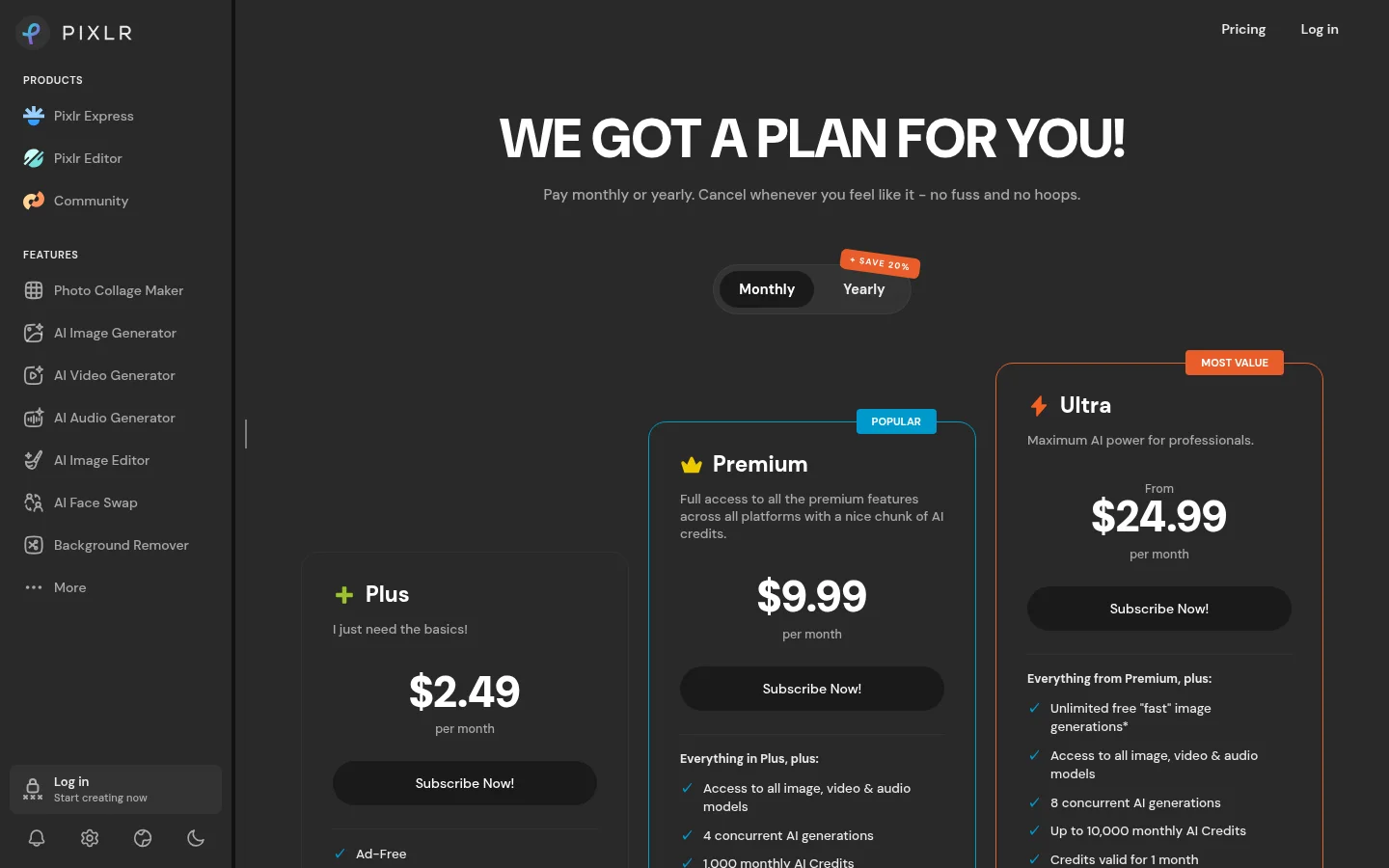
- Best value: Pixlr — real AI editing from about $2.49/month, the cheapest credible paid tier here.
- Best one-time purchase: Luminar Neo — buy it once, no subscription. The right answer for hobbyists who resent rent.
- Best for old or noisy photos: Topaz Photo AI — expensive, single-purpose, and nothing else comes close at restoration.
- The trap: almost every “AI” feature now runs on credits. The subscription is the floor, not the price.
The best AI photo editor for most people is Adobe Photoshop, because generative fill, AI masking and one-click removal are all in one place and they work on real client files. But it is the wrong buy for plenty of people: if you edit a few photos a month, Pixlr or Canva does 80% of it for a tenth of the cost, and if you hate subscriptions, Luminar Neo is a one-time purchase that never expires.
Below is what each one is genuinely good at, what it really costs once credits are counted, and who should skip it. Part of our AI image tools hub.
The best AI photo editors compared
| Tool | Best for | Pricing model | Entry price (Aug 2026) | Free tier? |
|---|---|---|---|---|
| Adobe Photoshop | Full-power editing + generative fill | Subscription | ~$10-20/mo (Photography Plan) | No (trial) |
| Adobe Lightroom | Batch edits, AI masking, catalogue | Subscription | Bundled in Photography Plan | No (trial) |
| Luminar Neo | One-time purchase, landscape/portrait AI | Perpetual licence | ~$119-179 once | No (trial) |
| Topaz Photo AI | Denoise, sharpen, upscale, restore | One-time + optional renewal | ~$199 once (+~$99/yr updates) | No (trial) |
| Canva | Design-led editing for non-designers | Freemium | Free; Pro from ~$15/mo | Yes |
| Pixlr | Cheap browser-based AI editing | Freemium | Free (limited); from ~$2.49/mo | Yes |
| Photoroom | Product and e-commerce photos | Freemium | Free tier; paid from ~$13/mo | Yes |
1. Adobe Photoshop — best overall AI photo editor
Photoshop is still the ceiling. Generative Fill and Generative Expand let you extend a frame or remove an object and get a result that survives being printed; the AI selection and masking tools handle hair and semi-transparency better than anything else on this list. In 2026 the AI layer is deep enough that a task that used to mean twenty minutes of manual masking is a brush stroke.
Real pricing: Photoshop is sold inside Adobe’s Photography Plan, which in August 2026 runs roughly $10-20/month depending on storage tier and region — and that plan includes a monthly allocation of generative credits that heavy users exhaust. Extra credits are a separate add-on. Budget for the tier above the one the marketing page shows you.
Who should skip it: anyone editing fewer than about ten photos a month. You will pay ~$150-240 a year for tools you touch occasionally, and the learning curve is real. Also skip if you need offline batch processing on a low-spec machine.
2. Pixlr — best value
Pixlr is the surprise of this category. It runs in the browser, needs no install, and packages its AI as separate focused apps — background remover, generative fill, object remove, upscale — rather than burying them in a timeline of menus. Quality is a step below Photoshop, but for social images, thumbnails and quick cleanups the gap is smaller than the price gap suggests.
Real pricing: free with a daily save limit and ads; paid plans start around $2.49/month with a monthly AI credit allowance and no ads. That is the cheapest legitimate paid AI editing on this list by a wide margin.
Who should skip it: professional retouchers and anyone working with RAW files at volume. Pixlr is built for speed, not colour-managed pipelines.
3. Luminar Neo — best one-time purchase
Luminar Neo is the answer for people who have decided they are never renting software again. It is AI-first rather than AI-bolted-on: sky replacement, relighting, skin and portrait tools, and structure enhancement are the core of the app, not add-ons. Landscape and portrait photographers get the most out of it.
Real pricing: a perpetual desktop licence, typically around $119-179, with extension packs sold separately. Skylum discounts aggressively, so the price you see on any given week is not the price. If you keep it two years it beats any subscription here.
Who should skip it: anyone who needs the newest generative features the month they ship. Perpetual licences mean you own what you bought, not what comes next.
4. Topaz Photo AI — best for restoration and upscaling
Topaz does one narrow thing better than anyone: rescuing images. Noise reduction on high-ISO shots, sharpening genuine motion blur, and upscaling small or old photos without the plastic look. If you are digitising family photos or salvaging low-light event shots, this is the tool.
Real pricing: around $199 one-time, with an optional annual renewal (roughly $99) to keep receiving new model updates. The app keeps working if you don’t renew; you just stop getting improvements.
Who should skip it: almost everyone editing current-generation phone photos. Modern phones already denoise well, and $199 for a problem you don’t have is the most common mis-buy in this category. If upscaling is the only thing you need, see our best AI upscalers roundup for cheaper options.
5. Canva — best for non-designers
Canva’s Magic Studio tools — Magic Eraser, Magic Edit, background remover, expand — sit inside a design editor rather than a photo editor. For anyone making social graphics, thumbnails or presentation images, that context is the point: you edit the photo and lay out the post in the same tab.
Real pricing: a genuinely useful free tier, with Pro from around $15/month unlocking the full AI feature set and brand kit. See our Canva alternatives if the price or the template look doesn’t suit.
Who should skip it: photographers. Canva has no RAW workflow, no colour management, and destructive editing by default.
6. Photoroom — best for product photos
Photoroom is built for one workflow: take a product shot, cut it out cleanly, drop it on a generated or plain background, repeat a hundred times. Batch processing and consistent output make it the pick for anyone running an e-commerce listing catalogue rather than editing individual images.
Real pricing: free tier covers occasional single images; paid plans from roughly $13/month for batch work and full-resolution exports.
Who should skip it: anyone not selling physical products. Outside that use case it is a background remover with a subscription attached.
7. Adobe Lightroom — best for editing at volume
Lightroom comes bundled with Photoshop in the Photography Plan, and for many photographers it is the one they actually open. AI masking (subject, sky, background, people) plus Generative Remove handle the majority of real editing work, and everything is non-destructive and catalogued. If you shoot events or sessions and need 200 consistent images out the door, this is the workflow.
Which AI photo editor should you pick?
- You edit professionally or for clients: Photoshop + Lightroom, and accept the credit top-ups.
- You edit a few images a month: Pixlr, or Canva if you also need layout.
- You refuse subscriptions: Luminar Neo.
- You are fixing old, noisy or tiny photos: Topaz Photo AI.
- You sell products online: Photoroom.
- You only need to remove backgrounds: don’t buy any of these — a free tool covers it. See free AI image editors.
The credit problem nobody puts on the pricing page
This is the thing to understand before you subscribe to anything in 2026. Generative features — fill, expand, remove, relight — cost credits, and credits are metered separately from your plan. A plan that advertises “AI included” typically includes an allocation that a single serious editing session can consume, after which you either wait for the monthly reset or buy a top-up.
Two consequences worth planning around. First, the advertised monthly price is a floor: work out your real per-image credit burn during the trial, not after. Second, non-generative AI — masking, denoise, upscale, background removal — is usually unmetered, which is why a cheaper tool that does those well can outperform an expensive one on total cost. Buy for the features you use weekly, not the demo that impressed you.
One more thing: check the commercial licence
Generated pixels are not automatically yours to sell. Adobe’s Firefly models are trained on licensed material and Adobe offers commercial-use terms, which is exactly why agencies pay for it. Cheaper tools vary, and free tiers frequently restrict commercial use outright. If the image is going on a client deliverable, a product listing or a paid ad, read the terms first — that is a five-minute check that prevents an expensive problem.
Bottom line
Photoshop is the best AI photo editor if editing is part of your job, and worth the credit overhead. Pixlr is the best value for everyone else, at a price low enough that being wrong costs nothing. Luminar Neo wins if you want to own rather than rent, and Topaz Photo AI is the specialist worth its high price only for restoration work. Start on a free tier or trial and measure your credit burn on real images before you commit to any annual plan.
More in the AI image tools hub, or compare generation instead of editing in our best AI photo generators guide.
FAQ
What is the best AI photo editor in 2026? Adobe Photoshop is the best overall thanks to Generative Fill, AI masking and commercial-safe Firefly output. Pixlr is the best value, Luminar Neo the best one-time purchase, and Topaz Photo AI the best for restoring old or noisy photos.
Is there a good free AI photo editor? Yes. Canva and Pixlr both have usable free tiers covering background removal, object erase and basic generative edits, with limits on saves, resolution or credits.
What is the best AI photo editor without a subscription? Luminar Neo, sold as a perpetual desktop licence for roughly $119-179, and Topaz Photo AI at about $199 one-time. Both keep working without renewal; you only lose access to future model updates.
Do AI photo editors work on RAW files? Photoshop, Lightroom, Luminar Neo and Topaz all handle RAW properly. Browser tools like Canva and Pixlr are built around JPEG and PNG and are not suited to a RAW workflow.
Can I use AI-edited photos commercially? It depends on the tool and the tier. Adobe’s Firefly-powered features are designed for commercial use; many free tiers restrict it. Check the licence terms before using generated content in ads, client work or product listings.
Why do AI editors run out of credits? Generative features are billed per use because each one runs a model on a server. Non-generative AI such as masking, denoise and upscaling is usually unmetered, which is why cheaper tools can be better value if you don’t need generative fill.