- The real price is half what most articles quote. Pro is $8.33/user/mo on annual billing and $16.99 month-to-month, a 51% gap.
- The free plan caps conversations at 30 minutes and allows only 3 file imports in the lifetime of the account. That’s the limit that ends most free trials, not the 300 minutes.
- There’s an active privacy class action in the Northern District of California over the notetaker joining meetings without participant consent.
- If your meetings involve client confidentiality, HR matters or anything under NDA, read the lawsuit section before you install it.
Otter.ai is the notetaker most people try first. It joins your Zoom, Google Meet or Microsoft Teams call, transcribes live, labels who said what, and hands you a summary with action items when the call ends.
The product works. The interesting questions are what it actually costs once you get past the headline number, where the free plan stops being useful, and whether you’re comfortable with how it obtains consent to record. This review covers all three.
What is Otter.ai?
Otter.ai is an AI transcription and meeting-notes service. Its notetaker syncs with your calendar and can join scheduled calls automatically, producing a searchable, speaker-labelled transcript in real time, plus an automated summary with takeaways and assigned action items.
It also does the boring-but-useful things well: you can search across every meeting you’ve ever recorded, ask questions about past conversations through its AI chat, and export transcripts as text, PDF, DOCX or SRT on paid tiers.
How much does Otter.ai actually cost?
This is where most reviews get it wrong, usually by quoting one billing cycle and not saying which.
Prices below were read from Otter’s pricing page on 10 August 2026.
| Plan | Annual (per user/mo) | Monthly (per user/mo) | What you get |
|---|---|---|---|
| Basic | Free | 300 min/mo, 30 min max per conversation, 3 lifetime file imports | |
| Pro | $8.33 | $16.99 | 1,200 min/mo, 90 min per meeting, 10 imports/mo, unlimited history |
| Business | $19.99 | $30.00 | Unlimited meeting minutes, 4 hrs per meeting, admin controls |
| Enterprise | Custom | SSO and SCIM (100-user licence minimum), HIPAA as a paid add-on | |
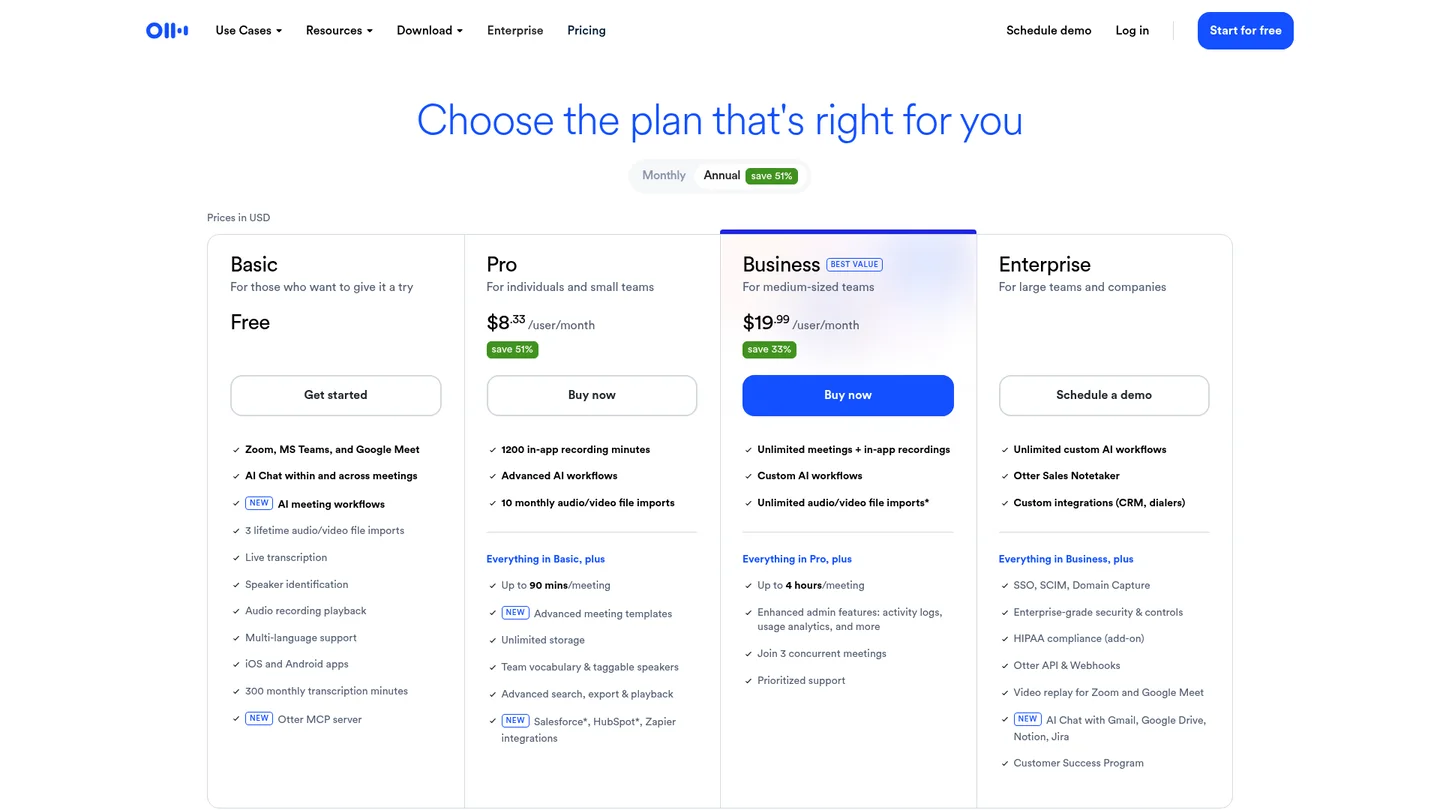
Two things worth knowing before you commit:
- The 51% annual discount is the whole story on price. At $8.33 Otter is one of the cheaper notetakers going. At $16.99 it’s mid-market. If you’re comparing it against a rival’s monthly rate, make sure you’re comparing like for like.
- Students and teachers get 20% off. With a .edu address, Pro Annual is $6.67/mo ($79.99 for the year) and Pro Monthly is $13.59.
Transcription minutes come out of a single shared pool across recorded meetings and imported files, and they don’t roll over. Plan for the month you actually have, not your average one.
The free plan’s real limits
“300 minutes a month” sounds generous. In practice, three other limits bite first.
- 30 minutes maximum per conversation. A standard hour-long meeting gets cut in half. This is the single biggest reason people upgrade.
- 3 file imports for the lifetime of the account. Not three a month. Three, ever. If you planned to feed Otter a backlog of recordings, the free plan won’t do it.
- Only your 25 most recent conversations are kept. Older ones drop off, which undermines the “searchable archive of everything” pitch.
You also get 20 AI chat queries a month, 5 custom vocabulary terms, and one concurrent meeting. The free tier is a genuine trial, not a workable long-term plan for anyone with a real meeting load.
Is Otter.ai being sued?
Yes, and it’s the thing most reviews of this product leave out.
In August 2025 a proposed class action, Brewer v. Otter.ai, Inc., was filed in the U.S. District Court for the Northern District of California. The complaint alleges that Otter’s notetaker joins Zoom, Google Meet and Microsoft Teams calls and records participants without obtaining their informed consent, and that those conversations are then used to help train Otter’s systems. It claims this breaches state and federal privacy and wiretap law. The case was reported by NPR when it was filed and has since been consolidated as In re Otter.AI Privacy Litigation. It remains pending, and none of the allegations have been proven.
Otter’s position is that it does obtain permission: users tick a box agreeing that conversations may be used for training and product improvement. The dispute is essentially about who that box binds. The meeting host agrees to it. The other people on the call, who may never have heard of Otter, did not.
Employment law firm Fisher Phillips published practical guidance for businesses off the back of the case, which is worth reading if you’re deploying a notetaker across a team rather than using one yourself.
What this means for you, practically:
- If your calls are internal and everyone knows the bot is there, this is a policy question rather than a blocker.
- If you record client calls, interviews, HR conversations or anything under NDA, get explicit consent at the top of the call. In two-party-consent states, that isn’t optional.
- The concern isn’t unique to Otter. It applies to every notetaker that auto-joins meetings. Otter is simply the one being litigated first, because it’s the biggest.
What real users report
Sentiment is more mixed than the product’s popularity suggests. On Trustpilot Otter sits at roughly 3.4 out of 5 across about 600 reviews (checked 10 August 2026), which is middling for a category leader.
The recurring complaints cluster in three places: billing and cancellation friction, transcription accuracy dropping on accented speech or noisy audio, and the notetaker turning up in meetings where someone didn’t expect it. That last one shows up repeatedly in Reddit discussions too, alongside praise for how much time it saves when it works.
The pattern is consistent: people who use it on clear-audio internal calls are happy. People using it on multi-speaker calls with mixed accents, or in organisations without a recording policy, are the ones writing the one-star reviews.
What Otter does well
- Live transcription on clean audio is genuinely good, with reliable speaker labelling.
- Summaries and action items save real time. You leave the call with usable notes already written.
- The searchable archive compounds. Six months in, being able to find what was actually agreed in a meeting is worth more than the transcription itself.
- Integrations are broad, covering Zoom, Meet, Teams, Zapier, and Salesforce or HubSpot on higher tiers.
- The annual price is competitive for what you get.
Who should skip Otter.ai?
Skip it if you handle confidential conversations and can’t reliably get consent from everyone on the call. Until the litigation resolves, that’s a real risk to manage rather than a theoretical one.
Skip it if you only meet occasionally. At a handful of calls a month, the free plan’s 30-minute cap will annoy you and the paid plan won’t pay for itself.
Skip it if your calls are sales calls. Tools built around CRM workflows will fit that job better than a general-purpose notetaker.
Skip it if audio quality is poor or accents are strong. Test on your own worst-case recording before you pay, because this is where accuracy complaints concentrate.
If you want to compare options first, our AI productivity tools hub covers the alternatives, and the best AI note-taking apps guide is the closer comparison.
Bottom line: is Otter.ai worth it?
For meeting-heavy internal work, yes. At $8.33/user/mo on annual billing it’s good value, the summaries genuinely save time, and the archive gets more useful the longer you use it.
For client-facing or confidential work, proceed carefully. Set a consent script, announce the bot at the start of every call, and check your state’s recording law first.
Don’t judge it on the free plan. The 30-minute conversation cap makes it a demo rather than a trial. If you’re serious, pay for one month at $16.99 and test it on real meetings before committing to the annual rate. Try Otter.ai →
FAQ
How much does Otter.ai cost in 2026? The Basic plan is free. Pro is $8.33 per user per month billed annually, or $16.99 billed monthly. Business is $19.99 annually or $30 monthly. Enterprise is custom-priced. Verified on otter.ai/pricing on 10 August 2026.
Is Otter.ai free? There’s a free Basic plan, but it caps each conversation at 30 minutes, allows only 3 file imports for the life of the account, and keeps just your 25 most recent conversations. It works as a trial, not as a long-term plan.
Is Otter.ai being sued? Yes. A proposed class action filed in August 2025 in the Northern District of California alleges Otter’s notetaker recorded meeting participants without their informed consent and used those conversations for training. It has been consolidated as In re Otter.AI Privacy Litigation and is still pending. The allegations have not been proven.
Is Otter.ai safe to use for confidential meetings? Only with explicit consent from everyone on the call, and you should check your local recording law first. Some U.S. states require all parties to consent. For work under NDA or covering HR matters, get your legal or compliance team to sign off before deploying it.
How accurate is Otter.ai? Accuracy is strong on clear audio with a small number of speakers and drops noticeably with background noise, crosstalk or strong accents. Test it on your own worst-case recording rather than a clean one before you decide.
Does Otter.ai join Zoom and Teams automatically? Yes. Once you connect your calendar, its notetaker can join Zoom, Google Meet and Microsoft Teams calls on its own. That convenience is also what sits at the centre of the privacy lawsuit, so make sure people expect it.
🧰 More: AI Productivity hub · Best AI note-taking apps · All AI Tools · How we test
Pricing and limits verified 10 August 2026. AI tool pricing changes often. Spotted something out of date? Tell us and we’ll fix it.
